Most common questions
Quick answers.
These cover about 90% of the questions we get. Find yours here before reaching out.
Why doesn't the app show specific teams for knockout matches?⌄
Because those teams haven't qualified yet. Knockout match slots show probability-weighted predictions based on who is most likely to advance from each group — not a fixed assignment. That's the whole point of the app.
Once the group stage ends and teams actually advance, those slots update to show the real teams. During the group stage, you're seeing our model's best estimate of who will be there.
Is ELO actually a good way to predict football?⌄
Better than you'd think — and better than most alternatives. A 2009 academic study comparing 8 different football rating methods found ELO had the highest predictive accuracy of all of them. FIFA switched their official world rankings to an ELO-based system in 2018 for exactly the same reason.
The honest limitation: ELO is slower to update than models that incorporate live squad news, injuries, or betting market signals. A team with a new manager or a key player injury looks the same in ELO as before those changes. We address this with recency weighting (recent matches count more) and a 125+ year training window (more data = more stable baseline).
We're not claiming to beat a professional bookmaker's model — we're claiming to give you a principled, consistent, transparent probability for each match. That's what ELO does well.
The probability for my team looks wrong. How is it calculated?⌄
Probabilities are calculated using ELO ratings and a Monte Carlo simulation — the same statistical framework used by professional analysts. See the full model explanation below.
The model is objective — it doesn't have opinions about teams. A team with a lower ELO rating than its opponent will show a lower win probability, even if they're your favorite. That's accurate, not broken.
One thing to know: ELO ratings reflect long-term form, not this week's news. A star player injury that happened yesterday may not yet be reflected. The model updates after every completed match result.
What does "Simulated Mode" do?⌄
Simulated Mode lets you enter hypothetical match scores and see how they'd change the entire bracket. It's a what-if engine. Full explanation here.
Switching to SIM mode doesn't affect the official results — it's a personal sandbox. Tap the LIVE / SIM toggle in the app header to switch between official and simulated views.
What is Team Path?⌄
Team Path shows a specific team's projected route through the entire tournament — round by round, venue by venue, with win probabilities at every stage.
To open it: tap any team name from the Rankings tab or from a match detail page. You'll see their advancement probabilities across all six stages (R32 through the Final), followed by a match-by-match timeline showing their most likely opponents, venues, dates, and win probabilities at each step.
This is the feature to use before booking travel. If your team has a 64% chance of reaching Atlanta in the Round of 16, that's when you book Atlanta — not before you know the bracket. Team Path updates after every match result.
What are My Rankings?⌄
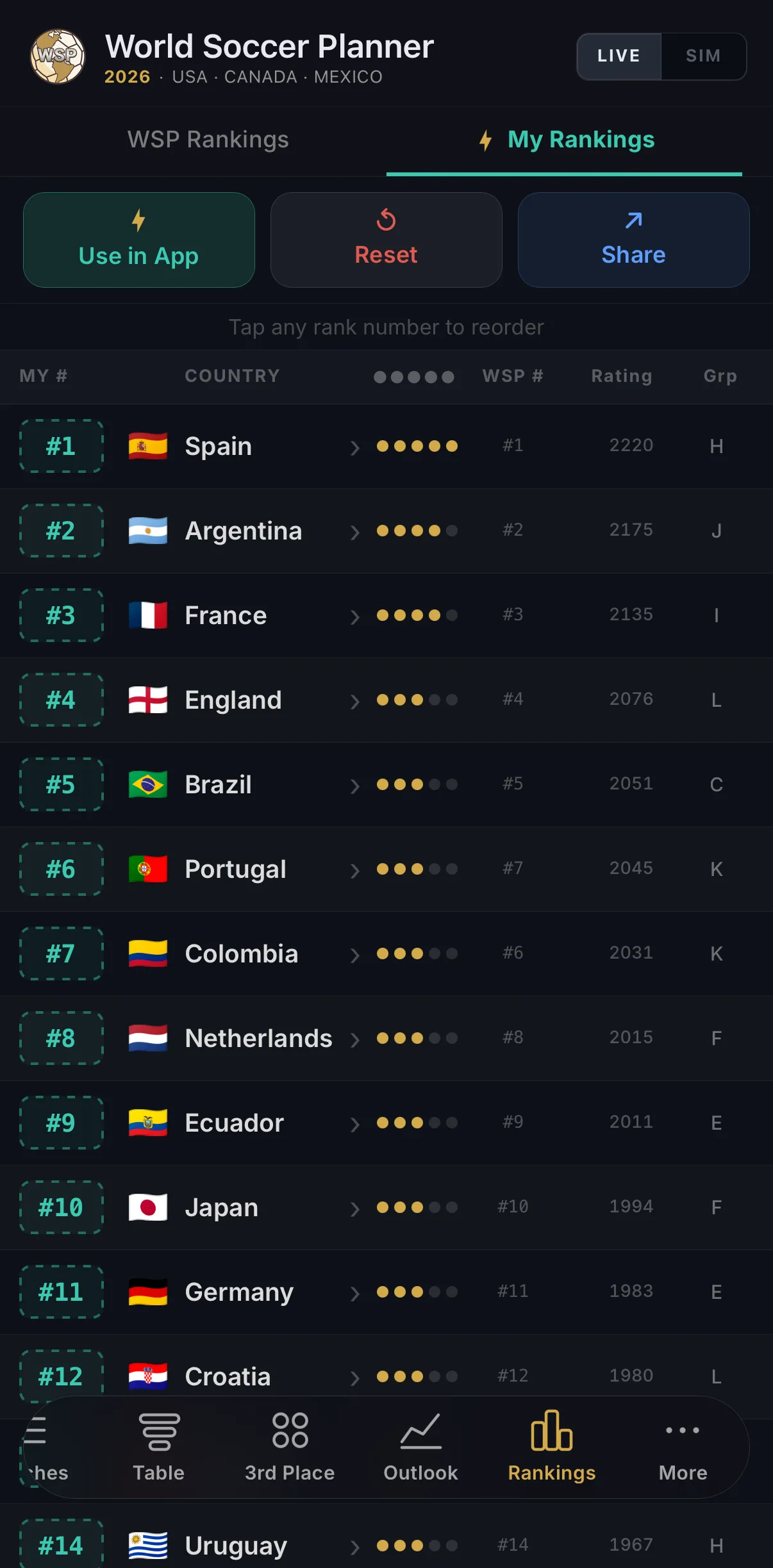
My Rankings lets you replace our WSP model with your own team strength ordering. If you think Morocco is underrated or Germany is past it, move them — and every probability in the app recalculates around your opinion.
To use it: go to the Rankings tab and tap My Rankings. Tap any rank number to reassign that team's position. Once set, tap Use in App — every match probability bar, Team Path projection, and Tournament Outlook updates instantly to reflect your model.
My Rankings runs 1,000 Monte Carlo simulations — fast enough to recalculate instantly as you reorder teams. Toggle back to WSP Rankings any time. This is a Pro feature — unlocks the full 2026 World Cup.
How do I save a match or mark myself as Going?⌄
Tap any match row to open its detail page. You'll see ★ Interested and ✈ Going buttons. Tap once to set, tap again to clear. Saved matches appear highlighted in your match list.
How do I share my path or my rankings?⌄
There are two things you can share:
Team Path card: Tap any team name from the Rankings tab or a match detail page to open their path sheet. Tap ↗ Share in the top right. This generates a card showing your team's projected road to the Final — round by round, with win probabilities at every stage.
My Rankings card: Go to the Rankings tab and tap My Rankings. Tap ↗ Share to generate a card showing your personal rankings for all 48 teams.
Both cards work on iMessage, WhatsApp, Instagram Stories, and anywhere else you can share an image. No account required to view them.
The third-place standings are confusing. What's going on?⌄
You're not confused — the 2026 format genuinely is this complicated. The tournament has 12 groups, but only 3 teams from each group advance automatically. The 8 best third-place finishers across all groups also advance, using a specific tiebreaker formula called Annex C. Full explanation below.
I purchased Pro but my features are still locked. What do I do?⌄
Go to Settings → Restore Purchases in the app. This re-validates your purchase receipt with the App Store or Google Play and re-unlocks Pro features. This works even if you changed devices or re-installed the app.
If restore doesn't work: make sure you're signed into the same Apple ID or Google account you used to buy. If you're still stuck, contact us with your order confirmation and we'll sort it manually.
Does the app work without an internet connection?⌄
Mostly yes. The app caches your last successful data load, so you can browse matches, see probabilities, and view your saved matches offline. The cache shows a "last updated" timestamp so you always know how fresh the data is.
Live score updates and real-time probability changes require an internet connection.
Under the hood
How the probability model works.
Every match shows a three-color probability bar — win, draw, loss. Here's exactly where those numbers come from.
The model has two components working together: an ELO rating system that measures each team's overall strength, and a Monte Carlo simulation that translates that strength into match probabilities.
61% win
18% win
Step 1 — ELO ratings
ELO is a rating system originally developed for chess and now widely used in football analytics. Each team has a numerical rating. When two teams play, the expected outcome is calculated from the difference in their ratings.
After each match, both teams' ratings update: the winner gains points, the loser loses them. The amount gained or lost depends on how surprising the result was — beating a much stronger opponent earns more points than beating a weaker one.
EA = 1 / (1 + 10(RB − RA) / 400)
where RA and RB are the current ELO ratings of each team.
ELO reflects long-term form across competitive matches. It's good at measuring which teams have consistently performed well against strong opposition. It doesn't know about yesterday's injury news, the weather in Dallas, or that a team is playing their fourth match in ten days. For that reason, the model is reliable but not omniscient.
Step 2 — Monte Carlo simulation
ELO gives us an expected result for a single match. But to calculate things like "what's the probability that Brazil wins the tournament?" we need to run the entire 104-match bracket thousands of times and see what happens.
That's Monte Carlo simulation. We run the full tournament 10,000 times, sampling match outcomes probabilistically based on each team's ELO ratings. The final probability for any outcome — advancing from a group, reaching the final, winning the tournament — is simply the percentage of those 10,000 runs where that outcome occurred.
At 10,000 simulations, the variance in our probability estimates is less than ±1%. That's more than enough precision for meaningful predictions. Running more simulations would barely change the numbers but would make the app slower.
When using My Rankings, the simulator runs 1,000 simulations instead — fast enough to recalculate instantly as you reorder teams.
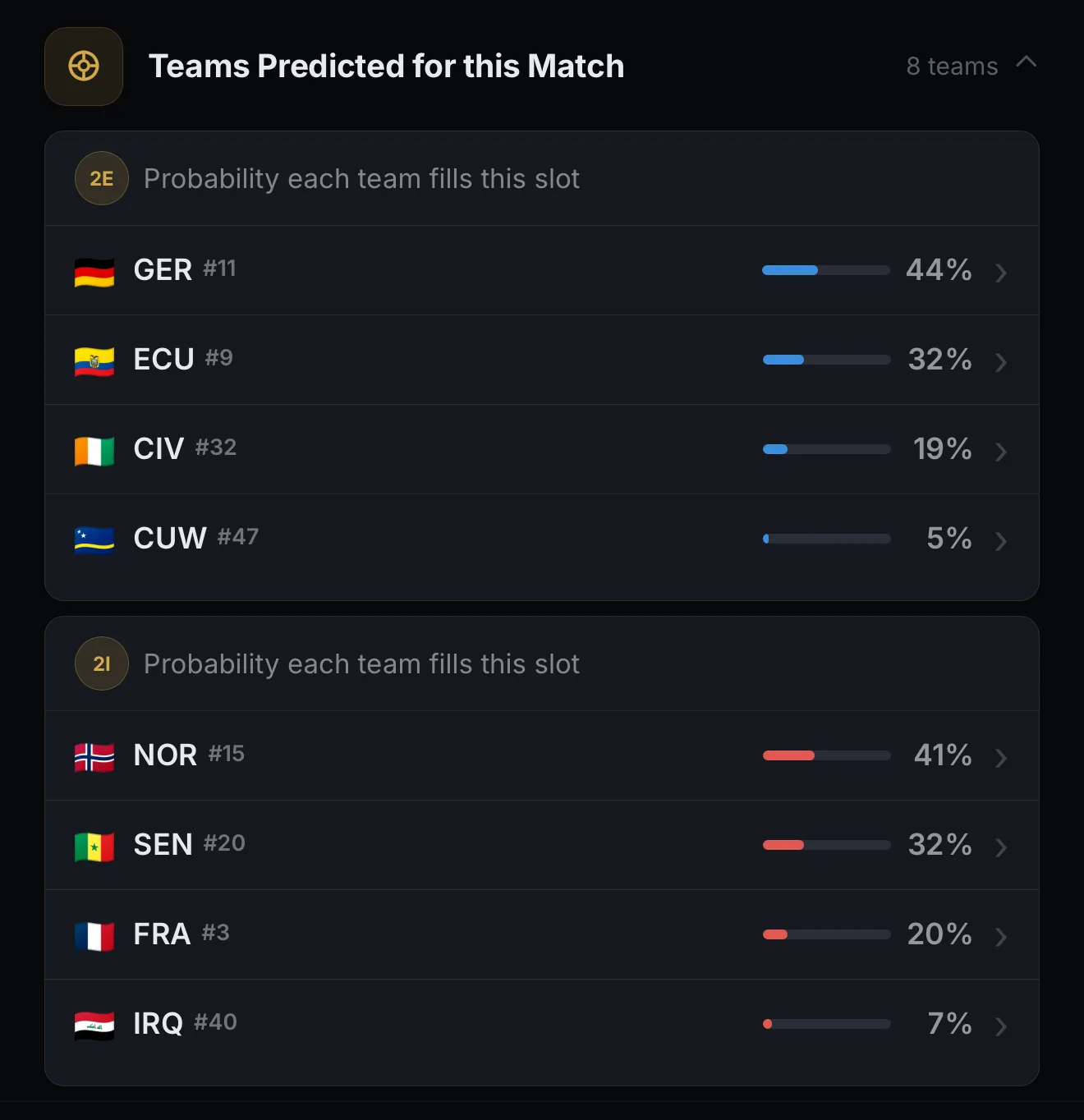
One direct output of the Monte Carlo model: for every knockout match slot, the app shows Teams Predicted for this Match — the probability distribution of which teams are most likely to fill each side of the bracket, based on all 10,000 simulated runs.
Step 3 — Live updates
Once a match completes, the official result gets incorporated. Both teams' ELO ratings update based on the outcome, and the Monte Carlo simulation re-runs for all remaining matches. This is why probabilities shift after surprising results — an upset changes the ratings, which changes the expected outcomes downstream.
The app shows a "Last updated" timestamp so you always know how fresh the data is.
Pro Feature · 2026 World Cup
Simulated Mode explained.
The what-if engine. Enter any score and watch the bracket recalculate in real time.
Switching to Simulated Mode doesn't affect official data. Your simulated overrides are yours alone — no one else sees them. Tap LIVE → SIM in the app header to toggle between official and simulated views at any time.
How to use it
- 1Switch to SIM mode using the LIVE / SIM toggle in the header. The header turns teal to confirm you're in simulation mode.
- 2Tap any match to open its detail page. You'll see score entry fields — enter your hypothetical result for that match.
- 3The bracket updates instantly. Group standings recalculate, advancement changes, and knockout match slots update to reflect your simulated world.
- 4Stack multiple overrides. You can simulate any number of matches simultaneously. Each override compounds on the others.
- 5Clear anytime. Tap "Reset simulation" to return all matches to their official or model-predicted state.
What the simulator calculates
When you enter a simulated score, the app runs through the full tournament logic:
Group stage: points, goal difference, goals scored, head-to-head record, fair play points — in that order, per the official 2026 tiebreaker rules. The group table updates in real time.
Third-place advancement: the Annex C matrix recalculates to show which third-place teams still advance. This is the most complex part of the 2026 format — the simulator handles it automatically.
Knockout bracket: advancement slots update, and the probability model re-runs for all remaining matches based on the new bracket state.
If you simulate a result for a match that hasn't been played yet, the app treats that result as the official outcome for the purposes of the simulation only. The actual probabilities for that match (when live) are still calculated from ELO. Your simulation overrides the outcome, not the model's assessment of likelihood.
Pro Feature · 2026 World Cup
My Rankings — explained.
Replace our model with yours. Every probability in the app updates around your team ordering.
When My Rankings are active, every match probability bar, Team Path projection, and Tournament Outlook percentage recalculates using your team ordering — not ours. Toggle back to WSP Rankings any time. Your custom order is saved to your device.
How to use it
- 1 Go to the Rankings tab and tap My Rankings. You'll see all 48 teams in WSP order by default.
- 2 Tap any rank number to reassign that team's position. Rank all 48 teams in the order you believe in.
- 3 Tap Use in App. Every match probability bar, Team Path projection, and Tournament Outlook updates instantly using your model.
- 4 Combine with SIM mode. My Rankings and SIM mode work together — your custom strength ratings feed directly into the bracket simulator.
- 5 Tap ↗ Share to generate a branded card showing your personal rankings for all 48 teams. Drop it in the group chat and let them argue.
My Rankings runs 1,000 Monte Carlo simulations — enough for meaningful probabilities and fast enough to recalculate instantly as you reorder teams. The WSP model runs 10,000 for maximum precision. Both use the same ELO-based framework.
Tournament structure
The 48-team format, explained simply.
The 2026 Men's World Cup uses a new format that's significantly more complicated than previous tournaments. Here's exactly how it works.
Previous World Cups had 32 teams in 8 groups of 4. In 2026, there are 48 teams in 12 groups of 4. This means the math for who advances is genuinely more complex — especially the third-place rule, which has no parallel in any previous tournament.
Group stage
Each group has 4 teams. Every team plays the other 3 teams in their group once. The top 2 finishers in each group advance automatically. That's 24 teams from 12 groups.
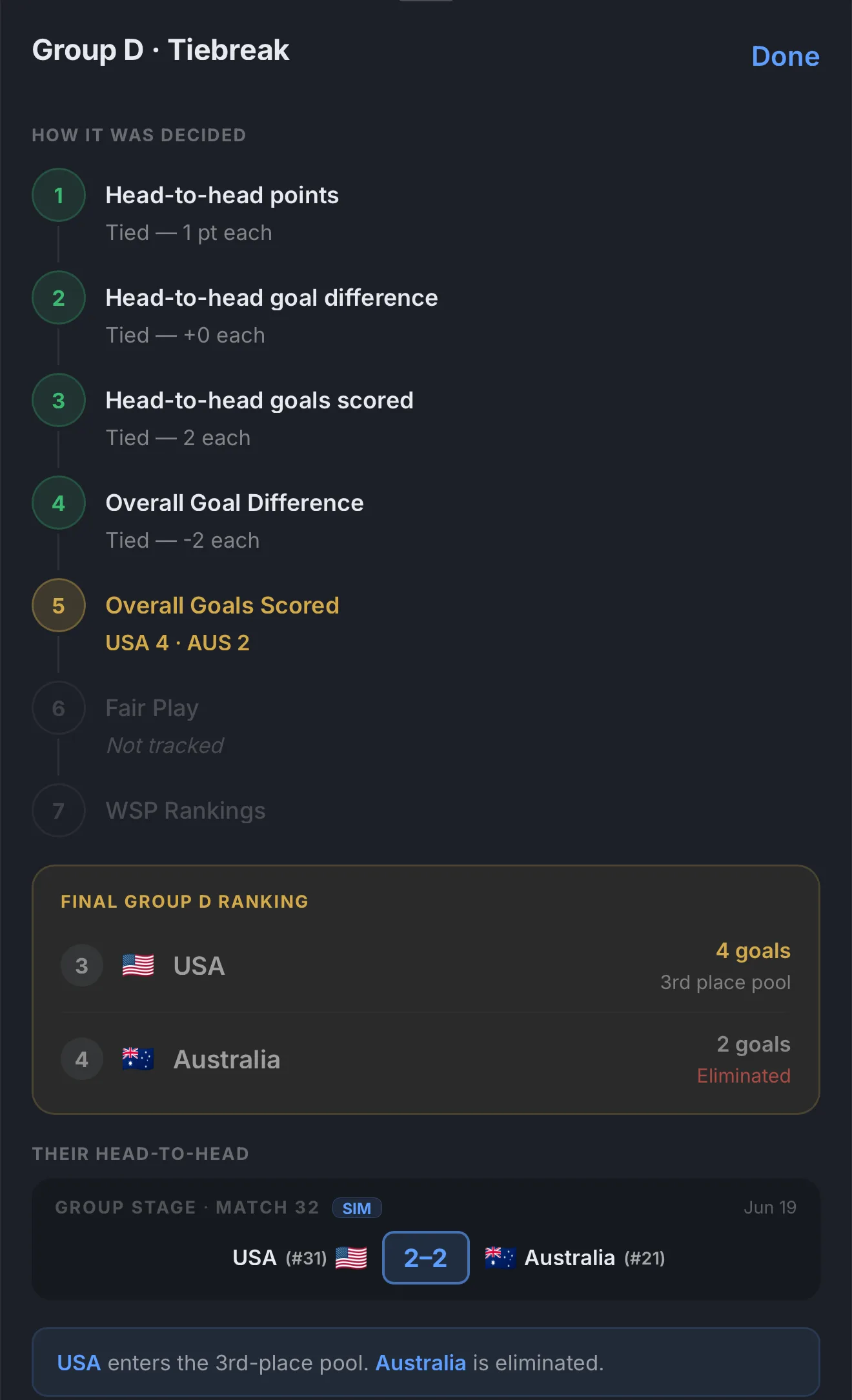
When two teams are level on points in the group stage, the app shows you exactly how the tiebreak was decided — step by step through each FIFA criterion, with the deciding factor highlighted in gold.
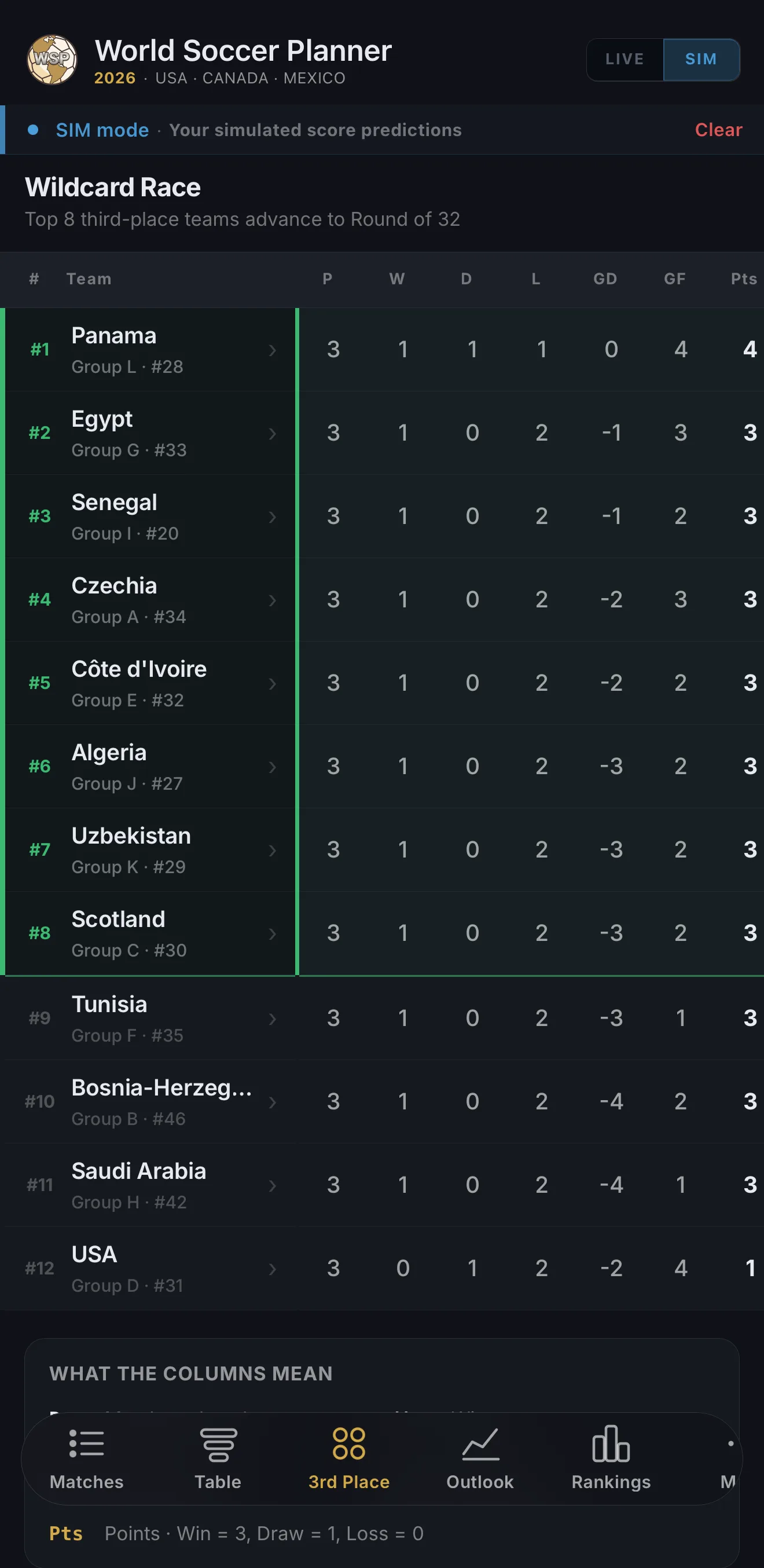
The tournament needs 32 teams for the Round of 32. To get from 24 to 32, the 8 best third-place finishers across all 12 groups also advance. That's the complicated part.
The third-place rule (Annex C)
After the group stage, all 12 third-place finishers are ranked against each other. The top 8 advance. Ranking is based on:
| # | Tiebreaker | Note |
|---|---|---|
| 1 | Points accumulated in the group | 3 for a win, 1 for a draw |
| 2 | Goal difference | Goals scored minus goals conceded |
| 3 | Goals scored | |
| 4 | Disciplinary record | Fair play points (yellow/red cards) |
| 5 | FIFA ranking | At time of the group draw |
This creates scenarios where a team can clinch third-place advancement before their final group game, or be eliminated despite winning — depending on results elsewhere. Our Third-Place grid in the app tracks all of this in real time and shows clinching and elimination scenarios for each team.
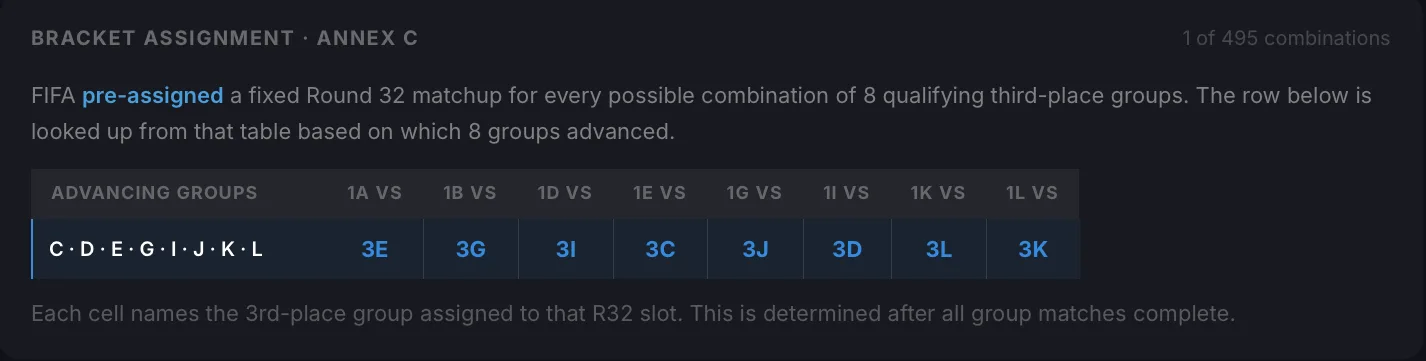
The third-place bracket assignment uses FIFA's Annex C — a pre-assigned lookup that maps every possible combination of 8 qualifying third-place groups to a fixed Round of 32 matchup. There are 495 possible combinations. The app resolves the correct row automatically.
Knockout rounds
After the group stage, the tournament proceeds as a single-elimination bracket. No draw is possible in knockout matches — extra time and penalties are used if needed. There are 72 knockout matches across the Round of 32, Round of 16, Quarterfinals, Semifinals, Third-place playoff, and Final.
| Stage | Teams | Matches | Format |
|---|---|---|---|
| Group Stage | 48 | 72 | New in 2026 12 groups of 4 |
| Round of 32 | 32 | 16 | New in 2026 Includes 8 best 3rd-place |
| Round of 16 | 16 | 8 | Same as before |
| Quarterfinals | 8 | 4 | Same as before |
| Semifinals | 4 | 2 | Same as before |
| 3rd Place Playoff | 2 | 1 | Same as before |
| Final | 2 | 1 | Same as before |